bad1080
- 6 Posts
- 7 Comments
Joined 5 months ago
Cake day: February 27th, 2026
You are not logged in. If you use a Fediverse account that is able to follow users, you can follow this user.


 2·4 months ago
you should update the OP with this information
i used their version of discover (forgot the name) and found it has mostly everything i was looking for (surprisingly so)
how would i know if Kubuntu 25.10 is affected (based on ubuntu)?
i guess this means yes?
command 'snap' from deb snapd (2.73+ubuntu25.10.1)
as it is lower than the version mentioned in the article “Upstream snapd: versions prior to 2.75”now the question is how do i force an update on that thing?
sudo apt upgradedid not include an update for snapd:Upgrading:
bpftool linux-headers-generic linux-libc-dev linux-tools-common
linux-generic linux-image-generic linux-perfInstalling dependencies:
linux-headers-6.17.0-20 linux-image-6.17.0-20-generic linux-tools-6.17.0-20
linux-headers-6.17.0-20-generic linux-modules-6.17.0-20-generic linux-tools-6.17.0-20-genericSuggested packages:
linux-toolsNot upgrading yet due to phasing:
fwupd libfwupd3Summary:
Upgrading: 7, Installing: 6, Removing: 0, Not Upgrading: 2
Download size: 212 MB
Space needed: 421 MB / 417 GB availableedit:
i triedsudo apt install snapdbut it returned:snapd is already the newest version (2.73+ubuntu25.10.1).
snapd set to manually installed.edit2:
or am i save because of this?:Ubuntu 25.10 LTS: snapd versions prior to 2.73+ubuntu25.10.1
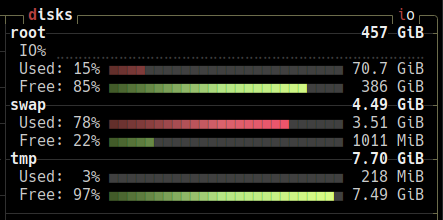
it lists multiple tmpfs:
tmpfs on /run type tmpfs (rw,nosuid,nodev,noexec,relatime,size=1616504k,mode=755,inode64)
tmpfs on /dev/shm type tmpfs (rw,nosuid,nodev,inode64)
tmpfs on /run/lock type tmpfs (rw,nosuid,nodev,noexec,relatime,size=5120k,inode64)
tmpfs on /run/credentials/systemd-journald.service type tmpfs (ro,nosuid,nodev,noexec,relatime,nosymfollow,size=1024k,nr_inodes=1024,mode=700,inode64,noswap)
tmpfs on /run/credentials/systemd-resolved.service type tmpfs (ro,nosuid,nodev,noexec,relatime,nosymfollow,size=1024k,nr_inodes=1024,mode=700,inode64,noswap)
**tmpfs on /tmp type tmpfs (rw,noatime,inode64)** (i am guessing it's this one)
tmpfs on /run/user/1000 type tmpfs (rw,nosuid,nodev,relatime,size=1616500k,nr_inodes=404125,mode=700,uid=1000,gid=1000,inode64)
tmpfs on /run/snapd/ns type tmpfs (rw,nosuid,nodev,noexec,relatime,size=1616504k,mode=755,inode64)
i hope these are all as konsole doesn’t seem to have a search function in kubuntu, why?
 1·5 months ago
for me it says “Version 25.08.1” in the “about” section of kate, what does it say for you? maybe this is something i could fix with downgrading the installed version of kate?
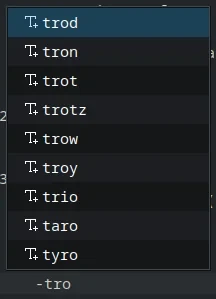
“trotz” is the one word i’d want it to auto-complete. the rest also show up in an >empty< document when it type “tro”. see: https://imgur.com/Jx27urr
this is what the “spellcheck” section looks like: https://imgur.com/g0agLyX none of the languages under “preferred languages” are ticked. i tried disabling “enabling autodetection of language” but it did not change this behavior.
here is what it says under “components” in the “about” section (i’d think a dictionary would show up here):
Kate: 25.08.1
KDE Frameworks: 6.17.0
Qt: Using 6.9.2 and built against 6.9.2
Ubuntu 25.10 (Wayland)
Build ABI: x86_64-little_endian-lp64
Kernel: linux 6.17.0-14-generic
it’s not like i can’t do a distro without plasma, i just refuse to xD